
When writing your APEX apps, it’s best to put business logic in packages. This practice eases maintenance, improves performance, and favors reuse. I set out to combine an Oracle 23c JSON Relational Duality View with my business logic package to simplify building REST APIs for my APEX apps. Read on to learn what I discovered. If you’re already using Oracle 23c Free, download the sample app at the end to try on your own system.
As we’ll see, the duality of JSON and relational interaction is a superpower. You get equally functional read and write access to the same data from both JSON and relational points of view. This packed a productivity punch for the use case I tried. It lets tools that work best with relational data keep doing so, while simultaneously offering easy access to the same data for JSON use cases like external systems integrations. The best of both worlds!
NOTE: The sample app uses APEX 23.2 and Oracle 23c Free (23.3).
(Technical Note: to see a larger version of any figure, right click on it and choose Open Image in New Tab from the context menu…)
Overview of the Data Model
The sample app uses the simple data model shown below, tracking things organized into categories and stocked in certain quantities in warehouses.

APEX App and Business Logic
The APEX pages in the sample app include an interactive report of things with a companion form-and-grid page to create or edit a thing and its related warehouse stock entries. Two additional grid pages let users edit the warehouses and categories reference data. We’ll focus on the Thing form-and-grid page since that’s where users create and modify data, and where interesting business logic gets enforced.

The eba_demo_thing package has functions and procedures that implement the app’s business logic. The table lists their names and describes what they do.
| Program Unit | Description |
validate_warehouse | Check warehouse is valid |
validate_category | Check category is valid |
validate_quantity | Check stock quantity is natural number |
validate_available | Check available date is no older than a year |
validate_price | Check price is between 0.01 & 100,000.00 |
consolidate_thing_warehouses | Consolidate thing stock for same warehouse |
closest_ninety_nine_cent | Return closest price that ends with 0.99 |
check_thing_required_fields | Check thing required fields are provided |
check_stock_required_fields | Check stock required fields are provided |
eba_demo_thing packageAs we saw earlier, the Thing page lets users create and edit a thing and its warehouse stock quantities. As shown below in Page Designer, we engage the business logic functions and procedures using validations and page processes in the Processing tab. Each validation is a one-line call to a function in the eba_demo_thing package that returns a boolean, passing in a page item value to be checked as an argument. Multiple Invoke API-type processes call a procedure in the same package to:
- Adjust the price to a more user-enticing *.99 cent amount
- Consolidate stock quantities from the same warehouse, if any
- Default stock entries with zero quantity for any missing warehouses

eba_demo_thing packageWe can see the business logic in action in the APEX app’s Thing page. Let’s create a new thing in the BOOKS category as shown below. Notice I’ve entered a price of 36.50 that does not end with *.99, and entered two separate stock entries for the same LAS VEGAS warehouse.

After clicking the (Create) button to dismiss the dialog, we can edit the new thing to see the page processes adjusted the price to 35.99, consolidated the 12 & 13 quantities in the LAS VEGAS warehouse, and created zero-quantity stock entries for the missing SEATTLE and BALTIMORE warehouses. So everything is working great in the APEX app.

Letting External Apps Work With Things
In addition to the APEX web app for end users, let’s suppose that external systems need to create, update, and delete things, too. This requires a set of appropriate APIs, and the de facto standard approach involves REST services with JSON data payloads. The external system will use HTTP requests to a well-known “endpoint” URL like:
http://phoenix:9094/ords/diveintoapex/thing/
on our system, using standard “verbs” like:
GET– to retrieve thingsGET– with a unique identifer added to the URL to access a particular thingPOST– to create a new thing (i.e. insert)PUT– to replace an existing thing with a modified version (i.e. update)DELETE– to remove an existing thing
All of the requests involve sending and/or receiving thing data in JSON format. So we need a strategy to represent a thing and its related warehouse stock quantities as a JSON document. As we’ll see next, the JSON Relational Duality View can help!
Add JSON Access with a Duality View
An Oracle 23c JSON Relational Duality View is a database view with a single JSON column named data that you can use to read and write information from one or more underlying tables. You define the view using a syntax that mirrors the structure of the JSON you want it to work with. I created a things_dv duality view using the DDL statement below. Starting with the Oracle 23.4 database release, all duality views will require the specially named attribute _id to uniformly act as their unique identifier. Even though I’m working with database release 23.3, I followed that best-practice in my things_dv definition.
Notice how I’ve mentioned my table names eba_demo_things, eba_demo_thing_categories, eba_demo_thing_stock, and eba_demo_warehouse and provided annotations like @insert, @update, @delete to indicate what DML operations I want to allow on each table. The duality view uses the foreign key constraints to understand how the tables relate. For each property, I indicate the JSON attribute name on the left side of the colon and then the appropriate database column name on the right side. When no annotations are present – as is the case for eba_demo_thing_categories and eba_demo_warehouse – then the duality view only allows referencing existing categories and warehouses, respectively.
create or replace json relational duality view things_dv aseba_demo_things @insert @update{ _id : id name : name description : description price : price available : available eba_demo_thing_categories @unnest { categoryId : id category : name } stock : eba_demo_thing_stock @insert @update @delete { thingStockId : id quantity : quantity eba_demo_warehouse @unnest { warehouseId : id warehouse : name } }}
I used the @unnest annotation to pull properties like categoryId and category up to the same level in the JSON as name, price, and available. I’ve also used it to pull the warehouseId and warehouse properties up to the same level as quantity. Without using this annotation, the properties from a related object will appear as a “nested” JSON object with an appropriate property name. The choice is up to the developer.
After creating the duality view, we can use our favorite tool like SQLcl or the SQL Developer extension for VS Code to query one of the things to see what it looks like in JSON. Let’s retrieve the one whose unique id is 2. The json_serialize() function takes the JSON data column name, and the returning clob pretty option lets the database know the JSON might exceed 4000 characters and should be formatted with nice indentation. We’ll see the powerful json_value() function multiple times throughout this article. It lets you easily access the value of any part of the JSON document you pass in, based on the flexible JSON Path expression language. Here we’re using the simplest possible expression to refer to the _id property at the “top” or root of the JSON document:
set pagesize 999set long 2000select json_serialize(data returning clob pretty) as data from things_dv where json_value(data,'$._id') = 2/
The result shows data from all four tables in our data model in a single JSON document reflecting the structure we defined using the DDL duality view definition above. It includes some additional “bookkeeping” info in a _metadata property as well that is automatically added.
DATA------------------------------------------------------------------------{ "_id" : 2, "_metadata" : { "etag" : "DC3F16548E190F49130482301365EF1C", "asof" : "0000000000C514BC" }, "name" : "Vibrant Horizons", "description" : "A compilation of live performances from the renowned jazz festival, capturing the essence of contemporary jazz.", "price" : 22.99, "available" : "2024-05-20T00:00:00", "categoryId" : 2, "category" : "MUSIC", "stock" : [ { "thingStockId" : 4, "quantity" : 7, "warehouseId" : 3, "warehouse" : "BALTIMORE" }, { "thingStockId" : 5, "quantity" : 2, "warehouseId" : 2, "warehouse" : "SEATTLE" }, { "thingStockId" : 6, "quantity" : 6, "warehouseId" : 1, "warehouse" : "LAS VEGAS" } ]}
A duality view is not just for querying data. It supports insert, update, and delete operations, too, if your duality view definition includes annotations allowing those. For example, we can insert a new thing in the BOOKS category with a quantity of 25 in the LAS VEGAS warehouse using the INSERT statement below:
 insert into things_dv(data)
 values(q'~
 {
    "name"        : "Building Oracle XML Applications",
    "description" : "Master Oracle using XML, SQL, XSLT, and XSQL pages",
    "price"       : 32.99,
    "available"   : "2023-09-01",
    "category"    : "BOOKS",
    "stock"       : [
        {
            "warehouse" : "LAS VEGAS",
            "quantity"  : 25
        }
    ]
 }
 ~')
Even before committing the inserted data, we can immediately wield the power of JSON/relational duality by querying the same data back from the underlying relational tables. The figure below shows the result of using SQL Developer in VS Code to run a familiar, relational query in the same pending transaction where we just inserted the JSON document using the duality view. I wanted to find all things with a particular name, a category name of BOOKS, and 25 or more quantity in stock in the LAS VEGAS warehouse. Our newly inserted book shows up in the results! Also notice the joins with my category and warehouse tables work because the duality view used the unique indexes on the category name (BOOKS) and warehouse name (LAS VEGAS) to lookup the respective primary key values. Of course, at this point we can commit the transaction to make the new thing permanent, or rollback to abandon the inserted data.

With the things_dv duality view in place, we have part of the solution sorted. And we’ve seen we can work with the duality view using SQL operations directly. Next, let’s focus on letting an external app access the JSON from the duality view using an ORDS REST service.
When using REST services in production, you will of course secure their access using one of the robust ways ORDS supports for doing that. But since here we’re in a learning mode, I’m creating services with no authentication for simplicity.
ORDS AutoREST for Duality Views
The easiest way to expose a duality view to REST clients is to enable AutoREST access. We can do this from SQL Developer (Web), by calling the ords.enable_object procedure, or by going to SQL Workshop > RESTful Services in the APEX Builder. By selecting the Enabled Objects in the RESTful Data Services tree, you’ll see a list of all AutoREST enabled objects. I clicked (Create AutoREST Object) and chose the THINGS_DV view from the list to enable it. I left the Object Alias the same as the name of the duality view, but as shown in the figure below you can adjust the name if you prefer. This alias is what appears in the URL that REST clients will use, as reflected in the Full URL field below.

THINGS_DV Duality View for AutoREST accessOnce we’ve AutoREST-enabled the duality view, we can create a dog_days.json file containing the following example JSON document:
 {
    "name"        : "David Hockney's Dog Days",
    "description" : "Colourful portraits of Stanley and Boodgie",
    "price"       : 32.99,
    "available"   : "2023-09-01",
    "category"    : "BOOKS",
    "stock"       : [
        {
            "warehouse" : "LAS VEGAS",
            "quantity"  : 6
        }
    ]
 }
Then, we can use a command-line utility like curl to insert the Dog Days book as a thing into our database using the AutoREST-enabled duality view.
% curl -X POST \-H "Content-Type: application/json" \-d @dog_days.json \http://phoenix:9094/ords/diveintoapex/things_dv/
The REST service responds with the JSON document that now contains the system-assigned _id property, an additional _metadata section, and a links array with multiple URLs related to the thing we just inserted. For brevity, I’ve replaced the actual links array entries with “…” below.
{"_id":22,"name":"David Hockney's Dog Days","description":"Colourful portraits of Stanley and Boodgie","price":32.99,"available":"2023-09-01T00:00:00","categoryId":1,"category":"BOOKS","stock":[{"thingStockId":232,"quantity":6,"warehouseId":1,"warehouse":"LAS VEGAS"}],"_metadata":{"etag":"64EC3C30EB434F8825FA09BB76EA49A6","asof":"0000000000BE113B"},"links":[...]}
What Checks Does a Duality View Enforce?
An AutoREST-enabled duality view is useful to quickly setup REST access for the same set of apps that you would trust to perform SELECT, INSERT, UPDATE, and DELETE operations against your duality view directly. The database will enforce basic datatype checking, not null columns, as well as ensure all check constraints, unique constraints, and referential integrity constraints are valid. However, the database is not aware of the business logic that you’ve implemented in your APEX application. For example, suppose we update the contents of the dog_days.json file as follows:
{ "name" : "David Hockney's Dog Days", "description" : "Colourful portraits of Stanley and Boodgie", "price" : 32.85, "available" : "2000-09-01", "stock" : [ { "warehouse" : 'LAS VEGAS' "quantity" : 6 }, { "warehouse" : 'LAS VEGAS' "quantity" : 5 } ] }
After repeating the curl command above to POST the document to the AutoREST-enabled duality view endpoint, we see that the JSON document returned looks like this:
{"_id":23,"name":"David Hockney's Dog Days","description":"Colourful portraits of Stanley and Boodgie","price":32.85,"available":"2000-09-01T00:00:00","stock":[{"thingStockId":233,"warehouseId":1,"warehouse":"LAS VEGAS","quantity":6},{"thingStockId":234,"warehouseId":1,"warehouse":"LAS VEGAS","quantity":5}],"_metadata":{"etag":"EFF821D650F846223E9298C5911B0D70","asof":"0000000000BE22CC"},"links":[...]}
Understandably, the price of the thing was not adjusted to the nearest 99-cent price. The two quantities related to the LAS VEGAS warehouse were not consolidated, the stock entries for the missing warehouses were not defaulted, and the available date from the year 2000 was allowed even though the application requires it to be within the last year or in the future.
Some kinds of business logic can be written as database table triggers, but more complex use cases like the warehouse quantity consolidation or ones involving querying and changing multiple related tables can run into mutating table errors using that approach. In many cases, developers find it best to represent their business logic in an application layer of PL/SQL packages as we’ve done here with the eba_demo_thing package documented above.
If we know ahead of time that the AutoREST API will be used by an app we trust to always insert and update valid data, or if we have enforced everything we need as table constraints or in table triggers, then the AutoREST-enabled duality view alone is all we’d need. However, if we want to enforce all the same business logic that you implement in your APEX application, then instead of the AutoREST approach, we need to use ORDS REST services that call our own PL/SQL APIs . We’ll explore that option next.
Creating External API with Business Logic
I started by creating a second eba_demo_thing_json package to handle the JSON-specific operations that we’ll surface as web services using ORDS. Doing this makes it possible to write unit tests that exercise the JSON API without involving HTTP requests. As shown below, there are functions to get multiple things; get, post, or put a thing and return it; and a procedure to delete a thing. Notice that I’ve used the new json type instead of json_object_t so I can easily use JSON path expressions on the contents. We’ll see multiple examples below.
create or replace package eba_demo_thing_json as -- Get Things with optional search ------------------------------------------------- function get_things( p_offset in number default null, p_limit in number default null, p_search in varchar2 default null) return json; -- Get a Thing by id ------------------------------------------------- function get_thing(p_id in number) return json; -- POST (Insert) a new Thing ------------------------------------------------- function post_thing(p_json in json) return json; -- PUT (Update & Replace) an existing Thing by id ------------------------------------------------- function put_thing(p_id in number, p_json in json) return json; -- DELETE an existing Thing by id ------------------------------------------------- procedure delete_thing(p_id in number); end eba_demo_thing_json;
If you’ve used json_object_t in the past, no worries. The key difference is that values of json type can also participate in SQL statements directly, while ones of json_object_t type are useful in PL/SQL only. It is straightforward to work with the same JSON document in PL/SQL as either json or json_object_t as necessary. You can pass a json value to the json_object_t constructor to work with it using that interface, and calling the to_json method on a json_object_t value returns it as a json value instead. I prefer using the simpler-looking json type in my APIs to more easily involve its values in json_value and json_transform expressions in my code explained later.
A third package eba_demo_thing_ords encapsulates the ORDS-specific aspects of the service implementation, like writing out the HTTP response payload. Its procedures are a thin wrapper around the JSON API package program units, and accept the incoming payload as CLOB arguments, since that is how ORDS makes it available to us as we’ll see in the next step.
create or replace package eba_demo_thing_ords as -- GET Things with optional search ------------------------------------------------- procedure get_things( p_offset in number default null, p_limit in number default null, p_search in varchar2 default null); -- GET a Thing by id -------------------------------------------- procedure get_thing(p_id number); -- POST (Insert) a new Thing -------------------------------------------- procedure post_thing(p_json clob); -- PUT (Update & Replace) an existing Thing -------------------------------------------- procedure put_thing(p_id number, p_json clob); -- DELETE an existing Thing by id -------------------------------------------- procedure delete_thing(p_id number); end eba_demo_thing_ords;
With these two packages in place, I used the APEX RESTful Services editor to define a thing module with templates for / and :id, and added appropriate one-line PL/SQL block handlers for each one. The figure below shows what the POST handler for /thing/ looks like. It’s a one-line call to eba_demo_thing_ords.post_thing passing in the special ORDS :body_text bind variable that contains the incoming request payload as a CLOB.

/thing/ template’s POST operation, passing request payload with :body_textThe complete set of operations I configured includes:
- GET
/thing/→eba_demo_thing_ords.get_things - POST
/thing/→eba_demo_thing_ords.post_thing - DELETE
/thing/:id→eba_demo_thing_ords.delete_thing - GET
/thing/:id→eba_demo_thing.get_thing - PUT
/thing/:id→eba_demo_thing.put_thing
Trying External API with Business Logic
Now, if we use the endpoint URL for our PL/SQL-based ORDS REST service to post the Dog Days JSON document from the command line:
% curl -X POST \-H "Content-Type: application/json" \-d @dog_days.json \http://phoenix:9094/ords/diveintoapex/thing/
We get back an error that the category is missing, which I had not noticed before.
{"$error":"Required field missing: Category"}
After updating dog_days.json to have a category property and trying again to post the file using curl…
{ "name" : "David Hockney's Dog Days", "description" : "Colourful portraits of Stanley and Boodgie", "price" : 32.85, "category" : "BOOKS", "available" : "2000-09-01", "stock" : [ { "warehouse" : "LAS VEGAS", "quantity" : 12 }, { "warehouse" : "LAS VEGAS", "quantity" : 13 } ]}
We get an error that the available date is too far in the past:
{"$error":"A new thing's available date must be in the past year or the future"}
Hoping the third time’s the charm, after correcting the dog_days.json available date value to be 2023-09-01 and trying the curl command again… It works and we get the following response below. Notice the price got adjusted to 31.99 and the categoryId & warehouseId got filled in appropriately. The stock quantities for the two LAS VEGAS warehouse rows got consolidated, and the missing warehouse entries were defaulted to have a zero stock.
{ "_id":21, "name":"David Hockney's Dog Days", "description":"Colourful portraits of Stanley and Boodgie", "price":31.99, "available":"2023-09-01T00:00:00", "categoryId":1, "category":"BOOKS", "stock":[ { "thingStockId":221, "quantity":25, "warehouseId":1, "warehouse":"LAS VEGAS"}, { "thingStockId":224, "quantity":0, "warehouseId":2, "warehouse":"SEATTLE"}, { "thingStockId":225, "quantity":0, "warehouseId":3, "warehouse":"BALTIMORE"} ], "_metadata":{ "etag":"2EA7CCB8CA550DCAE2E0180D61267D9F", "asof":"0000000000BF5695"}}
Next let’s try an update. If we change our dog_days.json file to contain the contents returned by our most recent curl command above, we can then edit it to adjust the values of the price, available, and quantity values for the three warehouses as shown below:
{ "_id":21, "name":"David Hockney's Dog Days", "description":"Colourful portraits of Stanley and Boodgie", "price":29.45, "available":"2024-03-04", "categoryId":1, "category":"BOOKS", "stock":[ { "thingStockId":221, "quantity":11, "warehouseId":1, "warehouse":"LAS VEGAS"}, { "thingStockId":224, "quantity":22, "warehouseId":2, "warehouse":"SEATTLE"}, { "thingStockId":225, "quantity":33, "warehouseId":3, "warehouse":"BALTIMORE"} ], "_metadata":{ "etag":"2EA7CCB8CA550DCAE2E0180D61267D9F", "asof":"0000000000BF5695"}}
After saving the edits to this file, we can try updating the thing business object by using curl to PUT the document back at its specific URL that includes the 21 value as its resource key at the end of the URL:
% curl -X PUT \-H "Content-Type: application/json" \-d @dog_days.json \http://phoenix:9094/ords/diveintoapex/thing/21
Notice in the response that the price was adjusted to the nearest ninety-nine cents, the warehouse quantities were updated, and the etag value changed.
{ "_id":21, "name":"David Hockney's Dog Days", "description":"Colourful portraits of Stanley and Boodgie", "price":28.99, "available":"2024-03-04T00:00:00", "categoryId":1, "category":"BOOKS", "stock":[ { "thingStockId":221, "quantity":11, "warehouseId":1, "warehouse":"LAS VEGAS"}, { "thingStockId":224, "quantity":22, "warehouseId":2, "warehouse":"SEATTLE"}, { "thingStockId":225, "quantity":33, "warehouseId":3, "warehouse":"BALTIMORE"}], "_metadata":{ "etag":"AD67594C22A913DB020442DC2F68D2DA", "asof":"0000000000BF9CED"}}
By leveraging the power of a duality view and ORDS REST services, and combining them with our business logic in a PL/SQL package, we achieved the goal we set out to accomplish. We now have the same application logic shared by both our APEX app and JSON-based REST APIs. Now let’s learn a bit more about the implementation details.
Flexing Our JSON/Relational Duality
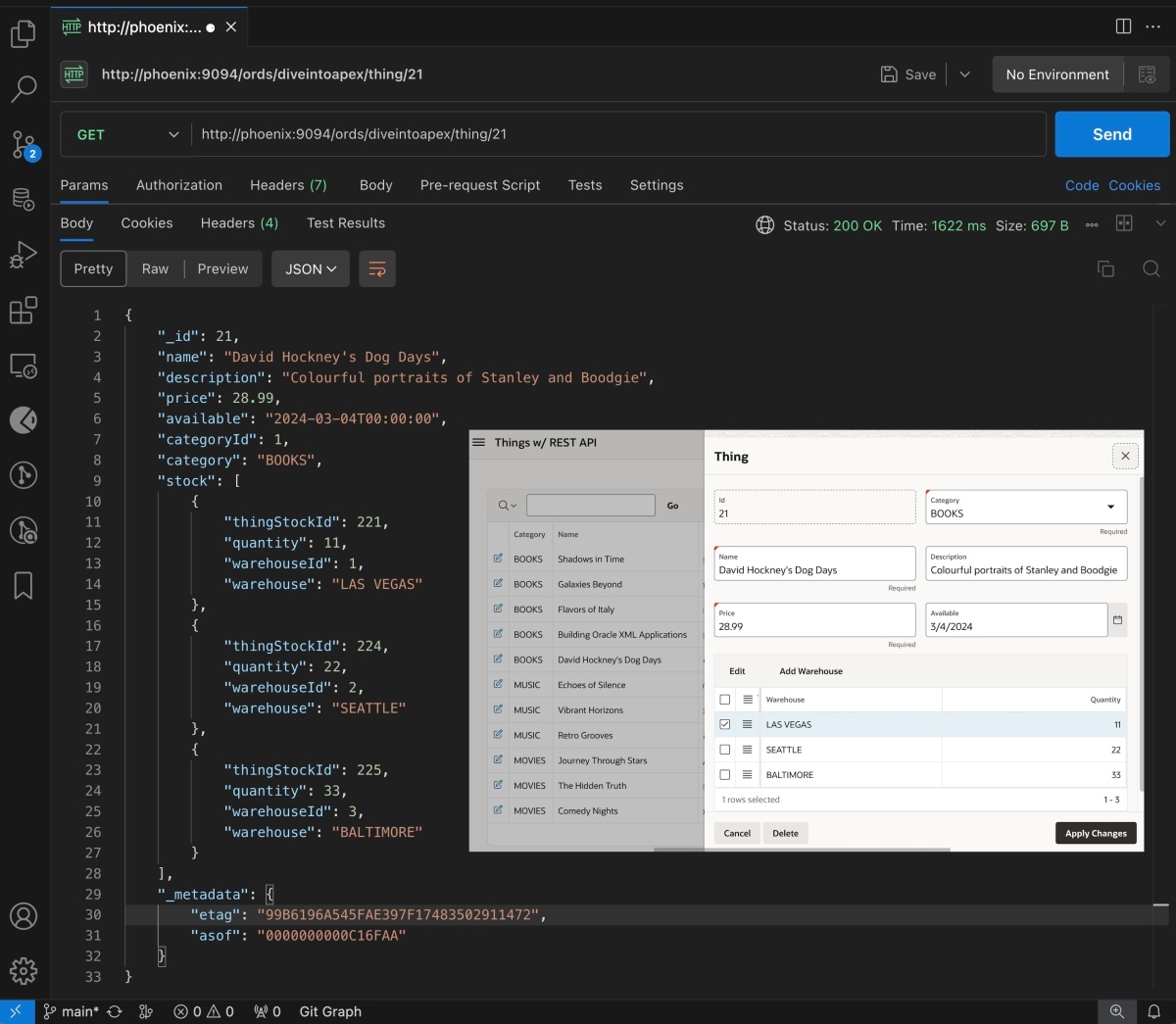
If we switch back to the APEX application, we can edit the new thing we were just working with using JSON to see the latest information about David Hockney’s Dog Days book in the web UI.

Let’s see what happens if we use the APEX application to edit something about this thing, for example the quantity available of David Hockney’s Dog Days book in the SEATTLE warehouse. After adjusting the amount from 22 to 99 and clicking (Apply Changes), let’s repeat the curl command to update the same thing from the command line.
% curl -X PUT \-H "Content-Type: application/json" \-d @dog_days.json \http://phoenix:9094/ords/diveintoapex/thing/21
This time the update fails and we see the error that the thing was changed by another user.
{"$error":"Thing changed by another user. Get the thing again and retry."}
The duality view automatically computes the etag as a checksum of the thing object’s data, including data of its nested stock information. The act of updating the SEATTLE warehouse quantity above changed data that was intrinsic to the David Hockney’s Dog Days thing object, so that caused its etag checksum to change. The value of the etag present in the dog_days.json file we are trying to PUT back to the JSON REST API no longer matches and the duality view automatically fails the update. By default the etag checksum takes all object properties into account, but the developer can use the @nocheck annotation when defining the duality view on properties that she doesn’t want to be included in the checksum calculation.
Exploring JSON Service API Implementation
The implementation of the post_thing function in the eba_demo_thing_json package performs four basic steps:
- Performs before insert or update processing
- Inserts JSON payload into
things_dvduality view, returning_idvalue - Executes after insert or update processing
- Returns the latest version of thing object from the duality view by id
-- PACKAGE: eba_demo_thing_json ------------------------------- POST (Insert) a new Thing----------------------------- function post_thing( p_json in json) return json is l_id number; l_json json := strip_links(p_json); begin before_insert_or_update(l_json,c_operation_insert); /* 1 */ insert into things_dv(data) /* 2 */ values (l_json) returning json_value(data,'$._id') into l_id; after_insert_or_update(l_id,c_operation_insert); /* 3 */ return get_thing(l_id); /* 4 */end post_thing;
The put_thing function is nearly identical. It does an update statement on the things_dv duality view instead of an insert and passes the constant c_operation_update to the before and after processing procedures.
-- PACKAGE: eba_demo_thing_json ---------------------------------------------------------------- PUT (Update & Replace) an existing Thing by id-------------------------------------------------------------- function put_thing(p_id number, p_json json) return json is l_json json := strip_links(p_json); begin before_insert_or_update(l_json,c_operation_update); /* 1 */ update things_dv /* 2 */ set data = l_json where json_value(data,'$._id') = p_id; after_insert_or_update(p_id,c_operation_update); /* 3 */ return get_thing(p_id); /* 4 */end put_thing;
Take another look at the elegant simplicity of the code above. By incorporating the duality view, we reduce a huge amount of coding work to a single line of declarative SQL. The INSERT statement does the “magic” to create a new JSON-based thing, and the UPDATE statement handles changing an existing thing.
This saves us from writing any code related to saving the initial or modified JSON document to the underlying tables, performing the lookups related to the category and warehouse, as well as detecting whether the row has been changed by another user. We don’t have to detect what has changed, figure out which underlying tables to involve, or anything really. We just supplement the simple SQL INSERT or UPDATE operation with the additional business logic before and after that is unique to our application.
Dissecting Before Insert/Update Logic
The before_insert_or_update procedure is below. It receives the JSON document as an in out nocopy parameter that it can reason over, pass around to other procedures, and modify as necessary before the resulting document will be inserted into or updated in the duality view. We’ve organized the code to make it easy to understand. We perform required fields checks, ensure there’s at least one warehouse, and adjust any missing or null warehouse quantities to be zero. Then we validate the available date if we’re performing an insert, and then validate the price, category, and warehouse and quantity values. Finally we adjust the price to the nearest 99-cent value.
-- PACKAGE: eba_demo_thing_json---------------------------------------------------------------- BEFORE INSERT OR UPDATE ON Thing business logic-------------------------------------------------------------- procedure before_insert_or_update( p_json in out nocopy json, p_operation t_operation) is begin check_required_fields(p_json); check_at_least_one_warehouse(p_json); adjust_missing_or_null_qty(p_json); if p_operation = c_operation_insert then validate_available(p_json); end if; validate_price(p_json); validate_category(p_json); validate_warehouse_and_qty(p_json); adjust_price_to_99_cents(p_json);end before_insert_or_update;
The helper procedures are all part of the sample app you can download and study, so we won’t analyze every line here. However, we’ll focus on three that taught me interesting techniques I discovered while building the demo.
In adjust_price_to_99_cents, notice how we can use json_value to access the value of any property in the JSON document using an appropriate JSON path expression. Here we’re accessing the price to pass it to another function that computes the closest 99-cent price. If the l_new_price is different from the l_price then we use the json_transform function to update the value of the price property.
-- PACKAGE: eba_demo_thing_json---------------------------------------------------------------- Adjust price to nearest *.99 -------------------------------------------------------------- procedure adjust_price_to_99_cents(p_json in out nocopy json)is l_price eba_demo_things.price%type; l_new_price eba_demo_things.price%type;begin l_price := json_value(p_json,'$.price'); l_new_price := eba_demo_thing.closest_ninety_nine_cent(l_price); if l_price != l_new_price then select json_transform(p_json, set '$.price' = l_new_price) into p_json; end if;end adjust_price_to_99_cents;
In the adjust_missing_or_null_qty procedure we’re using a slightly more complex JSON path expression to update any stock array entries with a null or missing quantity property to set their quantity = 0. These examples only scratch the surface of what json_transform can do. Please see the documentation to learn more about its abilities to easily make multiple changes to a JSON document with a compact, familiar syntax.
-- PACKAGE: eba_demo_thing_json---------------------------------------------------------------- Adjust missing or null quantities to zero -------------------------------------------------------------- procedure adjust_missing_or_null_qty(p_json in out nocopy json)isbegin select json_transform(p_json, set '$.stock[*]?(@.quantity == null || !exists(@.quantity)).quantity' = 0) into p_json; end adjust_missing_or_null_qty;
The last interesting thing I’ll highlight is the ability for json_path to return values into user-defined types, including collection types. This makes processing JSON data a lot more natural for PL/SQL developers. In the validate_warehouse_and_qty procedure, notice I’ve defined a t_stock record type and a t_stock_tab type that’s a table of t_stock records. With the new support in 23c we can use the returning t_stock_tab clause of the json_value function to easily assign the array of stock objects to the l_stock_tab variable of the same t_stock_tab type. Then, we can use a familiar PL/SQL loop to process the results. Here I’m using it to validate the quantity and warehouse values of each stock array entry.
-- PACKAGE: eba_demo_thing_json---------------------------------------------------------------- Validate warehouse and quantity values-------------------------------------------------------------- procedure validate_warehouse_and_qty(p_json in json)is type t_stock is record( warehouse eba_demo_warehouse.name%type, warehouseId eba_demo_thing_stock.warehouse%type, quantity eba_demo_thing_stock.quantity%type ); type t_stock_tab is table of t_stock; l_stock_tab t_stock_tab; begin l_stock_tab := json_value(p_json,'$.stock' returning t_stock_tab error on error); for j in 1..l_stock_tab.count loop if not eba_demo_thing.validate_quantity( l_stock_tab(j).quantity) then error('INVALID_QUANTITY'); end if; if not eba_demo_thing.validate_warehouse( l_stock_tab(j).warehouse, l_stock_tab(j).warehouseid) then error('INVALID_WAREHOUSE'); end if; end loop; end validate_warehouse_and_qty;
Examining After Insert/Update Logic
In the after_insert_or_update procedure, we consolidate the warehouses and if we’re performing an insert operation, default any missing warehouses. Here again I took advantage of the JSON/Relational duality since I’m reusing shared business logic from the eba_demo_thing package that I wrote using familiar relational table processing code.
-- PACKAGE: eba_demo_thing_json---------------------------------------------------------------- AFTER INSERT OR UPDATE ON Thing business logic-------------------------------------------------------------- procedure after_insert_or_update( p_id in number, p_operation t_operation) is begin eba_demo_thing.consolidate_thing_warehouses(p_id); if p_operation = c_operation_insert then eba_demo_thing.default_missing_warehouses(p_id); end if;end after_insert_or_update;
For example, in default_missing_warehouses I found it easiest to get the job done using a merge into statement with a when not matched clause. With JSON/Relational duality, you can use the right tool for the job without worrying about keeping the JSON and relational worlds in sync.
-- PACKAGE: eba_demo_thing---------------------------------------------------------------- Default any missing warehouses for a thing with zero stock--------------------------------------------------------------procedure default_missing_warehouses(p_id in number)isbegin merge into eba_demo_thing_stock tgt using (select id from eba_demo_warehouse) src on (src.id = tgt.warehouse and tgt.thing_id = p_id) when not matched then insert (thing_id,warehouse,quantity) values (p_id,src.id,0);end default_missing_warehouses;
Sharing Both Logic and Error Messages
As shown below, the APEX application defines translatable error messages as Shared Component text messages.

In the context of the Thing page in the APEX app, the validations reference these messages using the built-in substitution variable syntax &APP_TEXT$MESSAGE_KEY. with the prefix APP_TEXT$ followed by the name of the translatable text. For example, as shown below the Validate Category validation references &APP_TEXT$INVALID_CATEGORY. in the Error Message setting.

APEX_TEXT$ substitution string to reference INVALID_CATEGORY text messageI wanted all the JSON API business logic to use the same text messages, so I implemented the error() function below to let the eba_demo_thing_json package code get the job done. By setting the name of the workspace, it sets the the right context to reference any error message by key for a given app id using the apex_lang.message function.
-- PACKAGE: eba_demo_thing_json---------------------------------------------------------------- Raise error based on translatable message using message key-------------------------------------------------------------- procedure error( p_key in varchar2, p0 in varchar2 default null)isbegin apex_util.set_workspace(c_workspace); raise_application_error(-20001, apex_lang.message(p_name => p_key, p0 => p0, p_application_id => c_app_id));end error;
Then, throughout the code in eba_demo_thing_json, code calls this error() function. One example of this is in the validate_category function below:
-- PACKAGE: eba_demo_thing_json---------------------------------------------------------------- Validate category-------------------------------------------------------------- procedure validate_category( p_json in json)isbegin if not eba_demo_thing.validate_category( json_value(p_json,'$.category'), null) then error('INVALID_CATEGORY'); end if; end validate_category;
Pagination, Filtering & Total Count in SQL
For my last “trick”, I found I needed to implement pagination and searching functionality for the GET /thing/ endpoint. My first instinct was to define the GET /thing/ handler as an ORDS Collection Query type handler with the query:
select datafrom things_dv
However, this setup returned the data in a way that was different from the AutoREST-enabled duality view’s GET /things_dv/ endpoint we saw earlier. In particular, each JSON document is understandably presented as the value of the data column in the query result like this:
{ "items" : [ {"data":{"_id":1, ... }}, {"data":{"_id":2, ... }}, {"data":{"_id":3, ... }} ], "links" : [ : ]}
After checking with colleagues on the ORDS team to ask if there was some declarative way to suppress the data column’s appearance in the results, I learned there wasn’t currently a way to achieve that. This makes sense, since AutoREST is optimized for ease of use. When you enable a table, view, or duality view for AutoREST access, you instantly get a rich set of filtering, pagination, and CRUD capabilities. However, once I needed to route the the POST, PUT, and DELETE operations through my own PL/SQL package API to enforce app-specific business logic, I learned it wasn’t yet possible to take advantage of the AutoREST functionality only for the GET operation.
In the end, I found a SQL-only solution to achieve a simple set of pagination and filtering features for my GET handler that I implement in the get_things procedure of the eba_demo_thing_json package:
----------------------------------------- Get Things with optional search--------------------------------------- function get_things( p_offset in number default null, p_limit in number default null, p_search in varchar2 default null) return json;
After creating the thin wrapper procedure in eba_demo_thing_ords, I defined the GET /thing/ handler as shown below, with skip, pageSize, and search parameters defined as shown.

GET /thing/ handlerThe get_things function body is below. It returns the JSON document created by a SQL statement whose three parts include:
- Common table expression
xto select thing ids based on an optionalp_searchstring (matching onnameanddescriptionproperties) and compute total rows - Common table expression
yto select up top_limitrows fromthings_dvusing the idsxidentifies and also determinehas_morestatus (true/false) - Main query that constructs JSON document with an
itemsarray of thing duality view documents fromy, adding inskip,pageSize,hasMore, andtotalRowsproperties.
--------------------------------------------------- Get Things with optional search------------------------------------------------- function get_things( p_offset in number default null, p_limit in number default null, p_search in varchar2 default null) return jsonis l_ret json;begin with x as ( select json_value(data,'$._id') as id, count(*) over () as total_rows from things_dv where( p_search is null or upper(json_value(data,'$.name')) like '%'||upper(p_search)||'%' or upper(json_value(data,'$.description')) like '%'||upper(p_search)||'%' ) order by json_value(data,'$._id.number()') offset nvl(p_offset,0) rows fetch next nvl(p_limit,3) + 1 rows only ), y as (select data, case when (select count(*) from x) > nvl(p_limit,3) then true else false end as has_more from things_dv where json_value(data,'$._id') in (select id from x) order by json_value(data,'$._id.number()') fetch first nvl(p_limit,3) rows only ) select json_object( 'items' value ( select json_arrayagg(data order by json_value(data, '$._id.number()') returning clob) from y), 'pageSize' value nvl(p_limit,3), 'skip' value nvl(p_offset,0), 'hasMore' value (select has_more from y fetch first row only), 'totalRows' value (select total_rows from x fetch first row only) returning clob) into l_ret; return l_ret;end get_things;
The result is that GET-ing a URL like:
http://phoenix:9094/ords/diveintoapex/thing/?pageSize=2
returns a response like:
{ "items": [ { "_id": 1, "name": "Echoes of Silence", "description": "Debut album featuring a mix of instrumental and electronic sounds by emerging artist Luna Wave.", "price": 15.99, "available": "2024-03-01T00:00:00", "categoryId": 2, "category": "MUSIC", "stock": [ ... ], "_metadata": { "etag": "FBC495C12B222462B92C943C65C1D951", "asof": "0000000000C68DB7" } }, { "_id": 2, "name": "Vibrant Horizons", "description": "A compilation of live performances from the renowned jazz festival, capturing the essence of contemporary jazz.", "price": 22.99, "available": "2024-05-20T00:00:00", "categoryId": 2, "category": "MUSIC", "stock": [ ... ], "_metadata": { "etag": "DC3F16548E190F49130482301365EF1C", "asof": "0000000000C68DB7" } } ], "pageSize": 2, "skip": 0, "hasMore": true, "totalRows": 9}
Adding a search parameter to narrow the results like this:
http://phoenix:9094/ords/diveintoapex/thing/?search=world&pageSize=2
yields a response like:
{ "items": [ { "_id": 5, "name": "The Hidden Truth", "description": "Documentary uncovering the mysteries of the ancient world, narrated by acclaimed historian Dr. Emily Santos.", "price": 9.99, "available": "2024-07-22T00:00:00", "categoryId": 3, "category": "MOVIES", "stock": [ ... ], "_metadata": { "etag": "7674537EF60C2FB955256B1B3A1AA824", "asof": "0000000000C68D4B" } }, { "_id": 6, "name": "Comedy Nights", "description": "Box set of the most hilarious stand-up comedy specials from the decade, featuring top comedians worldwide.", "price": 19.99, "available": "2024-08-05T00:00:00", "categoryId": 3, "category": "MOVIES", "stock": [ ... ], "_metadata": { "etag": "B6CBA70E784BFA0810D87A0E4CF83A72", "asof": "0000000000C68D4B" } } ], "pageSize": 2, "skip": 0, "hasMore": false, "totalRows": 2}
Installing the Sample
Since the JSON Relational Duality View feature is new in Oracle 23c, running the sample app yourself requires your downloading and using Oracle 23c Free. The APEX sample app is from version APEX 23.2, so you will also have to download the latest APEX release and install it into your Oracle 23c database. Using the latest available ORDS release is always recommended as well. This is the combination I’ve tested and documented here. Then, you can download the sample app from here and import it into your APEX 23.2 workspace.
In addition to these prerequisites, the only other installation step is to edit the source of the eba_demo_thing_json package to update the value of the two constants c_workspace and c_app_id to reflect the name of the workspace into which you install the sample and the application id the sample gets assigned in your workspace:
create or replace package body eba_demo_thing_json as -- TODO: Change the values of these two constants -- ~~~ to reflect your workspace and app id c_workspace constant varchar2(50) := 'DIVEINTOAPEX'; c_app_id constant number := 100; :end eba_demo_thing_json;
Hope you find the example useful!
 Dive Into APEX